

Object Storage
Internxt Rclone, CLI and WebDAV
Connect your Internxt Drive to Rclone natively or via WebDAV for more advanced file management
Get Internxt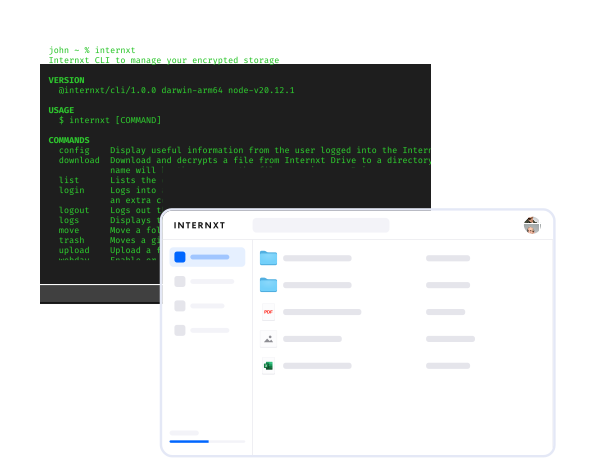
Internxt native Rclone support
Rclone is a command line tool that connects your computer to Internxt Drive through a flexible and scriptable interface. It is designed for users who want fast, reliable, and customizable file transfers.
Once set up, rclone connects your device directly to your storage account, making it easy to move files, run backups, and automate transfers across your systems.
How to install
ReadMe
Information about rclone’s usage, features, commands, and download instructions from our GitHub Repository.
User guide
Learn how to connect and configure Internxt Drive with rclone natively from our help center.
Updates
Stay updated with new releases for the Internxt CLI from our source code to find out about new releases and features.
Internxt CLI & WebDAV support
Internxt’s CLI interacts with your computer via a series of commands. A CLI offers a powerful and efficient way to manage various tasks with your Internxt Drive account.
Internxt CLI acts as a bridge between your computer and Internxt Drive through your chosen WebDAV client. WebDAV is an extension of HTTP that allows you to manage files between your local machine and your Internxt account.
How to install
Step 2
Log in to the CLI using the internxt login command.
Step 3
Choose your preferred WebDAV client.
Step 4
Insert the URL webdav.local.internxt.com and port 3005.
Select your plan
Premium customer support
30-day money-back guarantee
Open source and audited
Select your plan
Premium customer support
30-day money-back guarantee
Open source and audited
Get advanced file management with Internxt

Native rclone integration lets you sync, copy, and manage your files using one of the most trusted open source tools for cloud storage workflows.
Connecting Internxt Drive with rclone enables fast, flexible transfers, automation, and easy integration into existing backup or migration setups without compromising on security.
You can also use the Internxt CLI to connect to manage your files, with the same emphasis on security and award-winning architecture for maximum privacy.
Your files are encrypted on your device before ever reaching our servers, and only you possess the decryption key. This unwavering commitment to security puts you in complete control of your data.
Protect your files with Internxt Drive
Secure cloud storage built with privacy in mind
Download the Internxt CLI

Windows
For Windows 10 and higher.
Install using npm
Mac
For MacOS 11 Big Sur or higher.
Install using npm

Linux
Ubuntu and Debian
Install using npm
How to build and use Internxt CLI
We have created resources to help you download the Internxt CLI and get started with WebDAV.
ReadMe
Information about the Internxt CLI. Find out about its usage, features, commands, and download instructions from our GitHub Repository.
User guide
Learn more about the Internxt CLI, how WebDAV works, and security features from our help center.
Updates
Stay updated with new updates for the Internxt CLI from our source code to find out about new releases and features.
Manage your files like a pro
Enjoy direct control of your files with rclone or WebDAV.
Questions? We have answers
Rclone is an open source command line tool that lets you manage, sync, and transfer files between your computer and cloud storage services.
First, you need to download rclone from the official website, and then you can follow the installation steps from our help center.
The Internxt Command Line Interface interacts with a computer program by typing text commands instead of using a mouse and a Graphical User Interface (GUI).
WebDAV stands for Web Distributed Authoring and Versioning. Its basic functionality includes sharing, copying, moving, and editing files through a web server. WebDAV commonly uses HTTP security protocols to ensure secure communication between clients and servers.
To install our CLI on your computer and start using WebDAV, you can follow the installation steps from our GitHub page.
Yes. When enabled, the WebDAV feature uses a local-only server on your machine, thanks to our CLI. We implement the same zero-knowledge and end-to-end encryption methods to guarantee the privacy and security of your files.
We support the following WebDAV clients:
- CyberDuck
- Transmit
- Cadaver
- Finder
Internxt uses self-signed certificates for the WebDAV local server. While some WebDAV clients might raise a warning about these certificates, they are safe to ignore. The encryption protects your data regardless.
Download Internxt
Get seamless file management and secure cloud storage on the go with the Internxt mobile app for iOS or Android.



Newsletter
Want to hear from us when we launch new products or release a new update? Type your mail address and we’ll do the rest!

Get an exclusive discount!
Special offer: store files in privacy for less.
30-day money-back guarantee
Get an exclusive discount!
Special offer: store files in privacy for less.
30-day money-back guarantee